
You’ve combed through the websites of various IT service providers and weighed the pros and cons of each option. But you’re still not sure which MSP to go with.
You’re afraid of hiring the wrong company. What if they can’t resolve the specific issues that you’ve been experiencing or ones that may come up in the future? What if there are delays, interruptions, or unforeseen costs? Maybe you’re wondering, what will working with this company actually look like?
Those are fair questions, and this article answers them by walking through you through each step of PC Corp’s onboarding process. By the end, you should know what to expect when bringing on a well-managed IT provider. we hope to have answered the above questions and put your worries at ease.
This article is the first in a two-part series. Think of Part 1 as the foundation, covering the pre-onboarding phase (Steps 0-2) that happens before you go live with our services. Part 2 (Steps 3-6) covers what ongoing support looks like once your managed IT services onboarding is complete and your new environment is up and running.
What Is Pre-Onboarding and Why Does It Matter?
Similar to starting a new job and learning the ropes, the pre-onboarding stage focuses on getting you aligned: you learn what to expect from us, so your infrastructure can best support your business. Whether you’re switching providers or outsourcing your IT for the first time, this process helps make your transition smooth and protects you from data loss, increased costs, and unplanned downtime.
Pre-onboarding also gives you a preview of our working relationship. You should feel confident in the company handling the technology you rely on to run your business. That means no rushing through steps to get to go-live faster, no vague answers about what we found or what it will cost, and no surprises waiting for you on the other side. If something comes up that changes the plan, you’ll hear about it from us first. In return, the more you can share with us upfront — details about your current environment, your existing provider, and the software your team depends on — the faster and smoother the process will be for everyone.
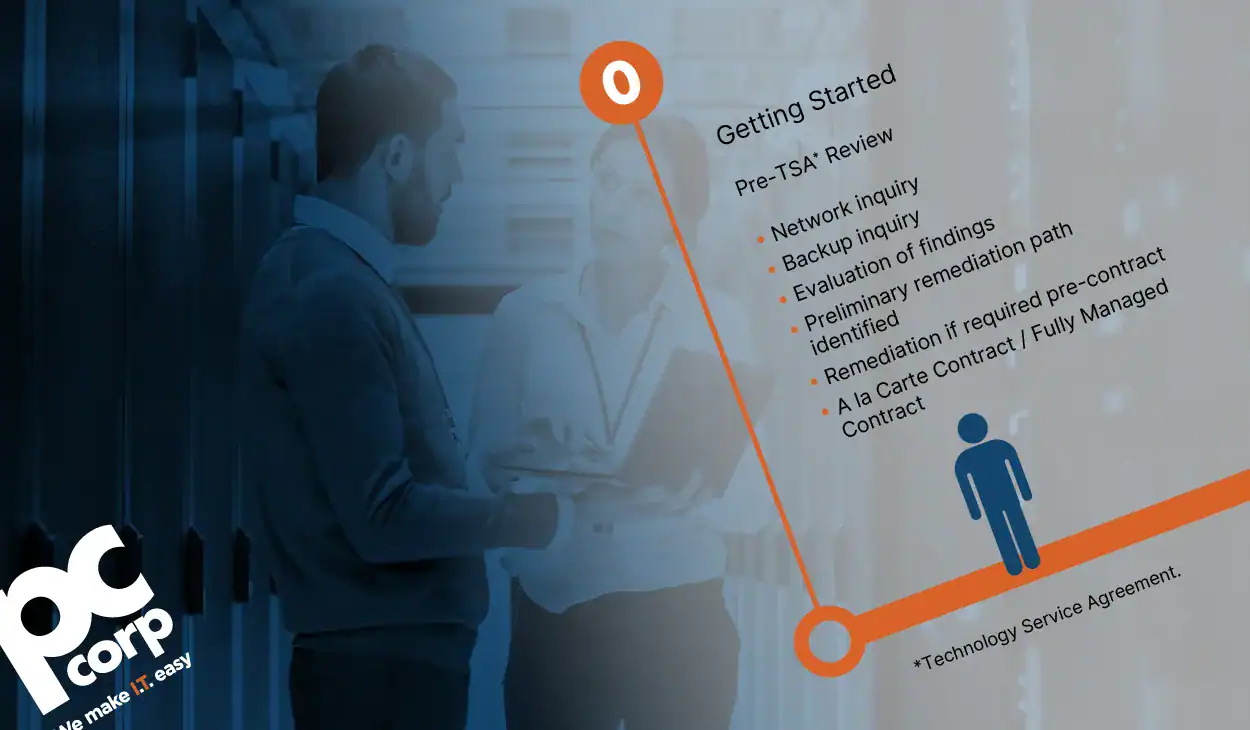
Step 0: Pre-TSA Review (Before You Sign)
As an Alberta-based company, building lasting relationships with local businesses shapes everything about how we operate. The Pre-TSA (Technology Service Agreement) review is where that starts. Before you even sign a contract, our team will work with yours, walking through your business, your IT environment, and the contract options that best fit your needs.
What Your Review Covers
Part of our review involves investigating your current network and infrastructure setup: What’s working for you? What isn’t working? What’s outdated? What’s posing a risk to your operations or security?
We’ll also assess your backup processes: How are you currently backing up your data? Would your files survive a system crash or cyber threat?
What Happens with Your Findings?
By learning about your current systems and analyzing your pain points, we’ll have the right information to create a preliminary remediation path. The findings are compiled into a pre-GAP analysis report that categorizes risks from high to low, for your organization and for our team. We review this report together with your key stakeholders so that everyone is on the same page about what needs to be addressed and in what order.
You may be curious about what might show up in those reports. Most often when looking at environments like yours, findings that raise a flag may include things like aging server infrastructure, consumer-grade networking equipment, or devices that are overdue for replacement.
Any of these could be a barrier to a smooth transition to managed services, so we’d rather surface them early and plan accordingly. Our goal in this phase is to help you identify challenges, risks, and solutions options so that we can tailor our services for your business. Should there be a need for any repairs or upgrades before we can fully manage your IT, we’ll tell you up front.
Your Contract Options and Start Date
Once you’ve received this information, we’ll decide on a date to begin the formal managed IT services onboarding phase, which depends on your findings and the severity of any existing IT issues.
In addition, you can choose a contract option that matches your needs and budget:
- Fully managed services – paying a fixed monthly fee for infrastructure & network maintenance, including user support.
- Proactive Managed Services – paying a fixed monthly fee for infrastructure & network maintenance with user support billed as time and materials.
Step 1: Deploy and Document (Weeks 1-2)
After signing the agreement and choosing a start date, you’ll reconnect with your dedicated team of IT experts — the same people who guided you through the pre-onboarding analysis of your IT environment alongside your sales rep — who will be your go-to for questions and concerns throughout the managed IT services onboarding process. They will give you the first installment of your Welcome Kit, which includes a clear roadmap of what will take place, when to expect it, and what you’ll need to have ready at each step.
You’ll also start to see changes to your environment. Here’s what gets installed and introduced by the end of week two:
- Remote Monitoring and Management (RMM): This gives us a bird’s eye view of your network, helping us see and resolve issues before you notice them.
- Ticketing Platform: You receive a single organized system where every request your team submits gets logged, tracked, and resolved
- Client Portal: Log in any time, to submit and track your resolved, in progress, and open IT requests.
- Basic Security Layer: Your systems and devices are protected from day one.
- PCC Support Assistant: Installed on every device, this application gives you access to quick support.
- Documentation Platform: You’ll have a single source of truth for storing, managing, and maintaining all data related to your IT environment.
- Recurring Maintenance and Backup Tickets: The routine tasks your environment needs are scheduled in advance, so they happen consistently and on time.
- Network Devices: Every network device is confirmed and recorded, so we have a complete and accurate picture of your environment from the start.
Doing all of these tasks in advance helps limit disruptions to your day-to-day operations during the transition and ensures your managed services actually support your goals going forward.
Step 2: Test and Validate (Weeks 2-3)
In the final step of pre-onboarding, your new systems, tools and processes will be evaluated to make sure everything, works properly before your full services officially go live. This includes validating your:
- Endpoints: Your devices get tested to make sure that every computer, laptop, and tablet connected to your network is active and accessible.
- Business-Critical Software Documentation: We outline what your team can’t function without before something goes wrong.
- Service Desk Support Escalation Protocol: You will know exactly how to get help and what response you can expect from us.
- Edge Security Setup and Connection: Every device outside your network gets checked and secured, so your remote workers are covered too.
- Backups: Your backups are put to the test to make sure your data is recoverable, not just stored.
After everything has been tested and confirmed, a change request process gets put in place. From that point forward, any changes to your environment will be documented and follow a clear procedure, so nothing new happens without your knowledge.
Recurring meetings also get scheduled at this point, giving you a consistent touchpoint to check in on how everything is operating during the managed IT services onboarding stage and beyond.
Most Frequently Asked Onboarding Questions
How long does this whole managed IT services onboarding process take?
The pre-onboarding process takes roughly two to three weeks, but the entire onboarding can take up to eight weeks. That said, every client is different. The timeline depends largely on what the pre-GAP analysis uncovers and whether any projects need to be completed before your go-live date can be set. Clients without significant areas of concern can sometimes be onboarded more quickly, while others may take longer depending on the scope of work involved. We’ll always give you a realistic picture of your timeline upfront.
Will my team be disrupted while this is happening?
Our detailed pre-onboarding plan is designed to ensure that there are little to no disruptions. Your team may notice some changes, like new icons in their task tray, and we’ll give them a heads up about what to expect so nothing comes as a surprise. The most likely source of any downtime would be project-related work, like a server replacement, and even then, we’d schedule that after hours or just before a weekend wherever possible to keep the impact on your workday to a minimum.
What do I need to have ready before we start?
The main things we’ll need are details about your current environment and a point person we can direct our questions to. If you’re switching from an existing IT provider, don’t worry! We’ll help coordinate that transition. It’s helpful to have your current provider’s contact information on hand, as well as their preferred method for receiving notice. Any existing documentation about your environment is valuable too, including administrative access into tools like Microsoft 365 or your line of business software The more information we can gather upfront, the smoother your transition will be. If you’re unsure about something or can’t track something down, we can help you find it.
What if the Pre-TSA Review turns up serious problems?
We will give you an honest response about what needs to be remedied and how much it will cost before we can begin transitioning to our managed services. Not everything that comes up will add to your costs. Minor fixes and standard agent installs are taken care of as part of the onboarding process. However, if something more significant is identified, like a server replacement or a net-new implementation, that work would be scoped and billed separately as a project on a time and materials basis. Either way, we will present your options and solutions clearly upfront, and you are not obligated to go with our recommendations.
When will we start to feel the difference?
Almost immediately. Even during pre-onboarding, we’ll typically uncover some stale configurations or settings that aren’t following best practices, and we’ll start addressing those right away. A simple example: if your machines are currently prompting staff to restart and install updates at nine in the morning, our agent will shift that to after-hours so your team can get straight to work when they sit down. By the time the full onboarding is complete, which takes about six to eight weeks, you should notice fewer interruptions, more reliable security, and faster resolution when issues do come up.
What Comes Next and Your Next Steps
After reading about part of the pre-onboarding process, hopefully one key message is clear: this managed IT services onboarding stage is meant to eliminate surprises, protect your environment, and give you a solid foundation for your IT infrastructure.
In the next post, you’ll get to see what Go-Live looks like, and what working with us day-to-day means for your team.
When you partner with PC Corp for our managed IT services, you get the confidence that your infrastructure will always be protected and optimized, so you can focus on your critical work in peace. From data backup and network maintenance to 24/7 device monitoring, you’ll have a team working behind the scenes to keep your technology running smoothly.
If you’re ready to partner, call us today to discuss how managed services can make your work environment more efficient and secure.
Not ready to talk yet? Learn more about the benefits of having a dedicated IT provider.

